TrackMyMoney
Offline Expense Tracker and Budget Planner
A private expense tracker and money manager for Android. Track income and expenses, set budgets, plan savings and record money you lent. Works offline, with no account and no ads.
- Platform
- Android
- Price
- Free, no ads
- Account
- Not needed
- Your data
- Stays on your phone
Overview
What is TrackMyMoney?
TrackMyMoney is a personal finance app for Android that keeps your money records on your phone. You add income and expenses, see where your balance stands on one home screen, and review any past month in Insights. It needs no sign up, no bank login and no SMS access, and it works with no internet connection.
Budgets come in two forms. Category budgets set a weekly, monthly or yearly limit for each category and show whether you are healthy, near the limit or over it. Spending budgets are named budgets for a trip, a project or a household, and you link transactions to them to track that spending on its own.
Savings plans set aside a share of each income, either as a percentage, a fixed amount per income or a fixed amount every month. The amounts are planned figures only. TrackMyMoney does not move or hold money, so it never pretends to be a bank account.
The Money Lent tracker records who you lent money to, how much, and when it is due. You log full or partial repayments and see who still owes you, including overdue items. Lending does not count as an expense, so your income and expense totals stay accurate. Backups, CSV export, seven currencies and light or dark themes are included too.
In the app
See it on your phone


Features
Everything TrackMyMoney does
- 01
Home Dashboard
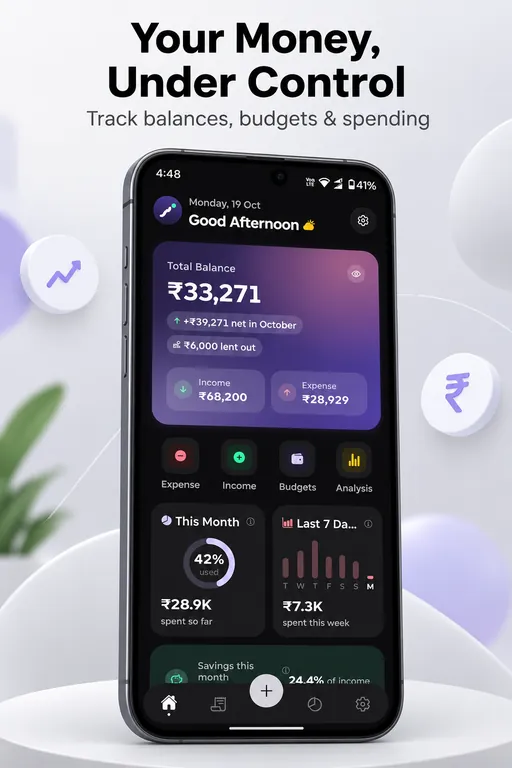
Your total balance, income minus expenses minus money still lent out, with this month and last 7 days at a glance and your top spending categories.
Total balanceThis month and last 7 daysTop spending - 02
Quick Add
Tap the center plus button to add an expense, income, money lent, savings plan or budget. Each action opens its own short form.
Five quick actionsNotes and tagsDate picker - 03
Transactions and Search
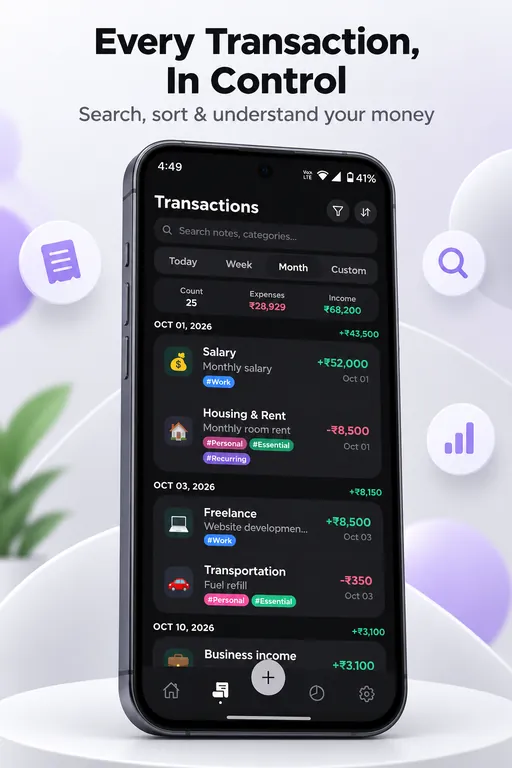
Every transaction in one list, with search by text and filters for date range, category, payment method, tag, amount and type. Save the views you use most.
Text searchCustom date rangesSaved custom views - 04
Category and Spending Budgets
Set limits per category for a week, month or year, or create named budgets for a trip, project or household and link transactions to them.
Weekly, monthly or yearlyHealthy and over-limit statusTrip and project budgets - 05
Savings Plans
Set aside a percentage of each income, a fixed amount per income or a fixed amount every month. Plans are worked out as income is added, and changing a rule never alters earlier months.
Percentage or fixed rulesSplit bar and trendsPlanned amounts only - 06
Money Lent
Record who you lent money to, the amount, the date and the due date. Add full or partial repayments and see each record as Active, Partial, Overdue or Repaid.
Partial repaymentsOverdue statusNot counted as an expense - 07
Insights and Analysis
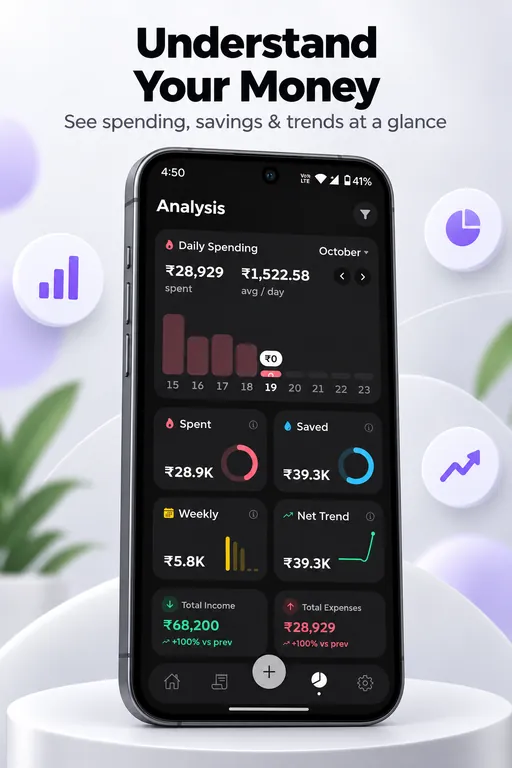
Review any month, pick a custom date range or compare with the previous period. Category breakdowns, weekly and long-term trends, and income against expenses show where your money goes.
Month navigatorCategory breakdownTrend charts - 08
Backup, Import and Export
Export a full JSON backup to restore on a new phone, or export transactions as CSV for Excel or Google Sheets. Imports show a preview before anything changes.
JSON backupMerge or replace importCSV export - 09
Customize Your Setup
Add your own categories, payment methods and tags. Choose from seven currencies and set light, dark or follow-the-phone theme.
INR, USD, EUR, GBP, JPY, AUD, CADLight and dark themesCustom categories
Who it is for
Built for people who
- Anyone who wants to track daily expenses without linking a bank account
- Families planning a monthly household budget
- Salaried and freelance earners who want to save part of every income
- People who lend money to friends or family and want a clear record
Under the hood
Built with
FAQ
Questions, answered
Do I need an account or internet to use TrackMyMoney?
No. TrackMyMoney works fully offline and needs no sign up. There is no bank login and the app does not read SMS.
Is my data sent to a server?
No. Your data is stored only on your phone in a local database. Nothing is sent to a server. Read the TrackMyMoney privacy policy for details.
Does TrackMyMoney connect to my bank or read my SMS?
No. It does not connect to any bank account and does not read text messages.
Are savings plans real savings?
They show planned amounts only. TrackMyMoney does not move or hold money, so a savings plan is a record of your intentions, not a bank balance.
Does lending money count as an expense?
No. Money you lend and the repayments you receive are tracked separately, so they do not change your income or expense totals.
What happens if I change my phone?
Export a JSON backup on the old phone, copy it to the new one and import it there. Save backup files regularly, because data cannot be recovered if the app is uninstalled without a backup.
Can I export my transactions to Excel or Google Sheets?
Yes. Use Export as CSV in Settings to get your transactions as a spreadsheet file.
Which currencies does TrackMyMoney support?
INR (the default), USD, EUR, GBP, JPY, AUD and CAD. Totals on Home and Insights use your base currency.
Is TrackMyMoney free?
Yes. It is free and has no ads. It is open source under the MIT license.
Explore
More from Vaqnova
Other products
Related services
Have a product idea like TrackMyMoney?
We design, build and launch custom software, mobile apps and SaaS products for teams in India and worldwide.