Custom Software
ERP vs CRM: Understanding the Difference
Quick Answer
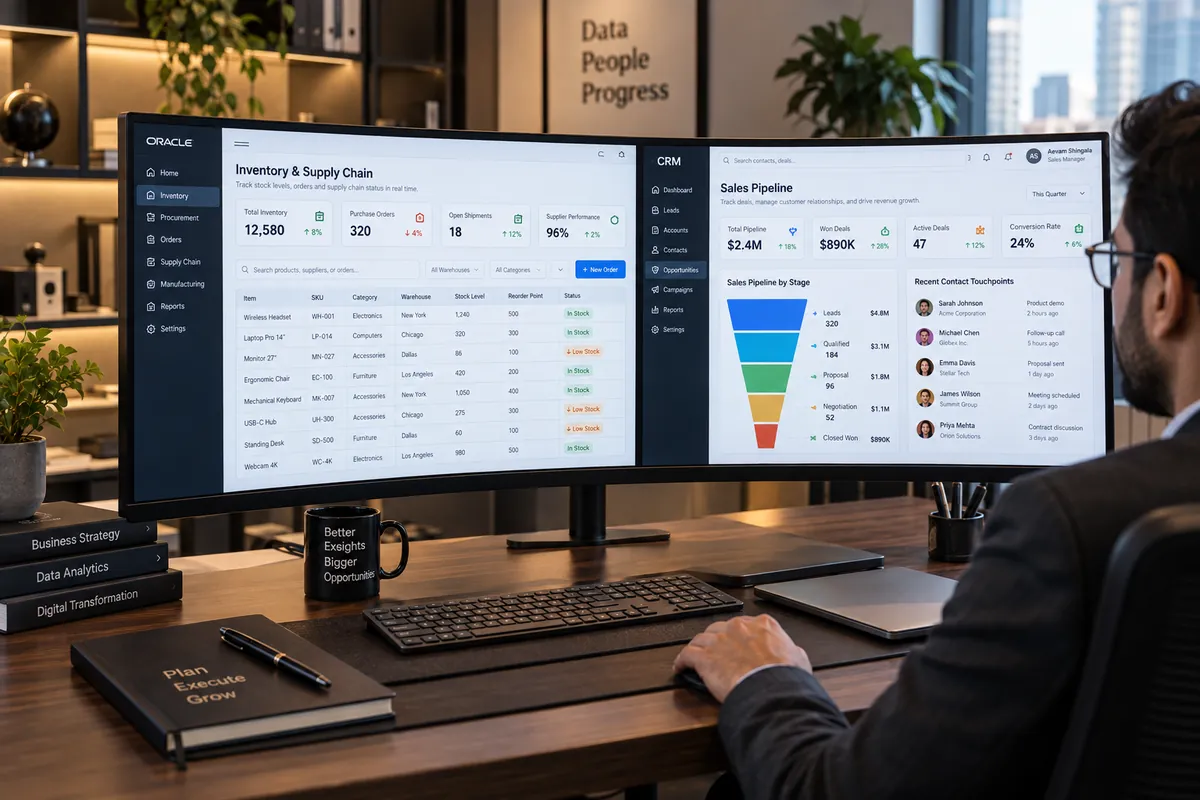
A CRM manages customer-facing work: leads, sales pipeline, communication and support. An ERP manages back-office operations: inventory, purchasing, production, finance and HR. Most growing businesses start with a CRM for sales and add an ERP when operations become complex, then integrate the two.
Introduction
ERP and CRM are often mentioned together, and both centralise business data, but they solve different problems for different teams. Choosing the wrong one first, or running both without connecting them, creates duplicate data and frustrated staff.
This guide explains what each system does, how they compare and how to decide what your business needs now.
What a CRM does
Customer Relationship Management software tracks everything that happens before and after a sale: leads and their sources, deals in the pipeline, calls, emails and WhatsApp conversations, quotes, follow-up tasks and support tickets. Its main users are sales, marketing and customer service teams.
Popular examples include Salesforce, HubSpot and Zoho CRM, and many businesses also build custom CRMs around a specialised sales process.
What an ERP does
Enterprise Resource Planning software runs operations: inventory and warehouses, purchasing and suppliers, manufacturing and bills of materials, order fulfilment, accounting, GST compliance, payroll and HR. Its users are operations, finance, procurement and management.
Examples range from SAP and Oracle for large enterprises to Odoo, Microsoft Dynamics, ERPNext and Tally-based setups common among Indian small and mid-sized businesses.
Which one does your business need first?
If your biggest problem is losing track of leads and follow-ups, start with a CRM. If it is stock mismatches, delayed orders, manual invoicing or month-end chaos, start with an ERP. Service businesses often run well on a CRM plus accounting software; product, trading and manufacturing businesses usually need an ERP sooner.
Why integration matters
When a deal is won in the CRM, the ERP needs the customer, products and prices to create the order and invoice. Without integration, staff re-enter the data and errors creep in. Connect the systems so customer records, orders, stock availability and payment status flow automatically, with one system defined as the source of truth for each type of data.
Off-the-shelf, custom or both
Standard ERP and CRM products cover common processes well. Customisation or a custom-built module makes sense when your pricing, approval, production or dealer processes are unusual, or when a standard product would need so many add-ons that a focused custom system is simpler.
Choose the first system by the failure you need to fix
Trace one real transaction from first contact to fulfilment. Mark which team creates each fact, where the official record lives and where the same value is typed again. If the main breakdown is lead ownership, follow-up or customer history, begin with the CRM workflow. If the issue is stock, purchasing, invoicing or fulfilment, map the operational record and evaluate ERP capabilities. Some organizations need neither system replaced; they need a clear source of truth and a reliable connection.
Before buying both, define the handoff: which system owns customer identity, product catalogue, order status and financial records? Decide what syncs, how often, what happens when a transfer fails and who reconciles conflicts. A diagram of these records is more useful than a long feature checklist. Related reading: custom software decisions, inventory workflow examples, and Vaqnova’s custom software service.
Run a small integration test using duplicate records, changed addresses and a rejected order. Confirm that staff can see which system is authoritative and correct an error without creating another copy. Integration adds maintenance and can expose data-quality issues, so budget for monitoring and a named owner as well as implementation.
Summary
Key Takeaways
- CRM is customer-facing; ERP is operations-facing.
- Start with the system that solves your most expensive problem today.
- Integrate both so data is entered once.
- Define which system owns each type of data.
ERP vs CRM
| Aspect | CRM | ERP |
|---|---|---|
| Main focus | Customers and revenue | Operations and resources |
| Main users | Sales, marketing, support | Operations, finance, procurement, HR |
| Typical modules | Leads, pipeline, contacts, tickets | Inventory, purchasing, production, accounting |
| Key outcome | More sales, better follow-up | Efficient operations, accurate finances |
| Adopt first when | Leads and follow-ups slip | Stock, orders or accounts get messy |
Pitfalls
Common Mistakes to Avoid
- Buying an all-in-one suite and using a fraction of it.
- Running CRM and ERP separately with manual re-entry between them.
- Customising a standard product so heavily that upgrades become impossible.
- Skipping data cleanup before migration.
FAQ
Frequently Asked Questions
Can an ERP replace a CRM?
Many ERPs include basic CRM features, which can be enough for simple sales processes. Businesses with active sales teams usually benefit from a dedicated CRM integrated with the ERP.
Is Tally an ERP?
Tally is primarily accounting and inventory software with ERP-like features. Many businesses use it alongside a CRM or a custom system for operations it does not cover.
How long does ERP implementation take?
For a small or mid-sized business, typically a few months, depending on the number of modules, data migration and training. Phased rollouts reduce risk.
Should I build a custom CRM?
Only if your sales process is genuinely unusual or standard CRMs need heavy customisation. Otherwise, configure an existing product and invest in integration.
Wrap-up
Final Thoughts
CRM and ERP are complementary. One helps you win and keep customers, the other helps you deliver to them efficiently. Choose based on your biggest bottleneck, and plan the integration from the start.
References
Sources
Let's talk
Build Your Next Digital Product
Vaqnova can help you choose, customise or build CRM and ERP systems and connect them so your data flows automatically.
Talk to Our Team